类似于“前往”项目的东西,DeepSeek 写的~
发表于 : 2026年 1月 8日 12:22
下面只是一个示例~
随机跳转外部链接
创建redirect.php 文件
效果图
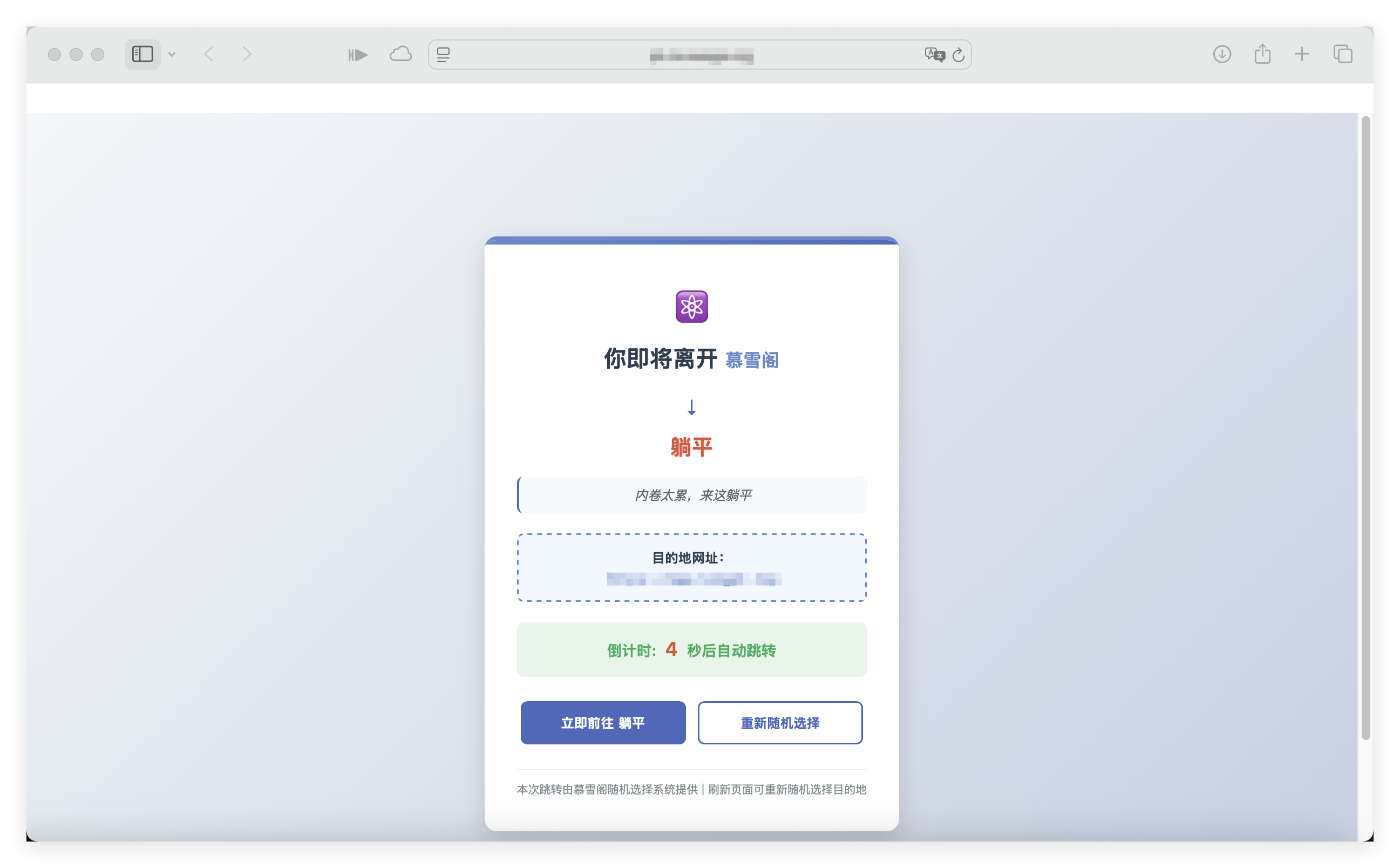
随机跳转外部链接
创建redirect.php 文件
代码: 全选
<?php
/**
 * 随机网址跳转脚本 - 带友好提示
 * 将用户随机重定向到预定义网址列表中的一个,并显示友好的提示信息
 */

// 设置响应头,确保使用正确的字符编码
header('Content-Type: text/html; charset=utf-8');

// 预定义的网址列表(包含网站名称)
$sites = [
    [
        'name' => '星陨阁',
        'url' => 'https://www.example1.com',
        'description' => '一个充满神秘与奇幻的地方'
    ],
    [
        'name' => '灵剑山',
        'url' => 'https://www.example2.com',
        'description' => '剑修圣地,灵气充沛'
    ],
    [
        'name' => '天机楼',
        'url' => 'https://www.example3.com',
        'description' => '洞察天机,预知未来'
    ],
    [
        'name' => '药王谷',
        'url' => 'https://www.example4.com',
        'description' => '珍稀草药,医者圣地'
    ],
    [
        'name' => '万法宗',
        'url' => 'https://www.example5.com',
        'description' => '万法归宗,修行圣地'
    ],
    // 您可以在此处添加更多网址
    // 格式:['name' => '网站名称', 'url' => '网址', 'description' => '网站描述'],

    // 这里是您提到的示例
    [
        'name' => '星陨阁',
        'url' => 'https://xingyingge.example.com',
        'description' => '星辰陨落之地,蕴藏无尽奥秘'
    ]
];

// 随机选择一个网站
$randomIndex = array_rand($sites);
$selectedSite = $sites[$randomIndex];
$siteName = $selectedSite['name'];
$siteUrl = $selectedSite['url'];
$siteDescription = $selectedSite['description'];

// 当前站点名称(可以根据需要修改)
$currentSiteName = "慕雪阁";

// 可选:显示跳转信息页面
echo "<!DOCTYPE html>
<html lang='zh-CN'>
<head>
    <meta charset='UTF-8'>
    <meta name='viewport' content='width=device-width, initial-scale=1.0'>
    <title>即将离开{$currentSiteName}</title>
    <style>
        body {
            font-family: 'Microsoft YaHei', 'Segoe UI', sans-serif;
            max-width: 800px;
            margin: 50px auto;
            padding: 20px;
            line-height: 1.6;
            background: linear-gradient(135deg, #f5f7fa 0%, #c3cfe2 100%);
            color: #333;
            min-height: 100vh;
            display: flex;
            align-items: center;
            justify-content: center;
        }
        .container {
            background-color: white;
            border-radius: 15px;
            padding: 40px;
            box-shadow: 0 10px 30px rgba(0,0,0,0.15);
            text-align: center;
            border-top: 5px solid #6a89cc;
            position: relative;
            overflow: hidden;
        }
        .container:before {
            content: '';
            position: absolute;
            top: 0;
            left: 0;
            right: 0;
            height: 5px;
            background: linear-gradient(90deg, #6a89cc, #4a69bd);
        }
        h1 {
            color: #2c3e50;
            margin-top: 0;
            font-size: 28px;
            margin-bottom: 20px;
        }
        .current-site {
            color: #6a89cc;
            font-weight: bold;
            font-size: 22px;
        }
        .destination-site {
            color: #e55039;
            font-weight: bold;
            font-size: 26px;
            margin: 10px 0;
            text-shadow: 1px 1px 2px rgba(0,0,0,0.1);
        }
        .destination-description {
            color: #666;
            font-style: italic;
            margin: 15px 0 25px;
            padding: 10px;
            background-color: #f8f9fa;
            border-radius: 8px;
            border-left: 3px solid #4a69bd;
        }
        .url-box {
            background-color: #f1f8ff;
            border: 2px dashed #6a89cc;
            padding: 15px;
            margin: 25px 0;
            border-radius: 8px;
            font-family: 'Consolas', 'Monaco', monospace;
            word-break: break-all;
            font-size: 16px;
            color: #2c3e50;
        }
        .countdown {
            background-color: #e8f5e9;
            padding: 15px;
            border-radius: 8px;
            margin: 20px 0;
            color: #27ae60;
            font-weight: bold;
            font-size: 18px;
        }
        .countdown-number {
            color: #e55039;
            font-size: 24px;
            margin: 0 5px;
        }
        .buttons {
            margin-top: 30px;
            display: flex;
            justify-content: center;
            gap: 15px;
            flex-wrap: wrap;
        }
        .btn {
            display: inline-block;
            padding: 12px 30px;
            text-decoration: none;
            border-radius: 8px;
            font-weight: bold;
            font-size: 16px;
            transition: all 0.3s ease;
            min-width: 140px;
        }
        .btn-primary {
            background-color: #4a69bd;
            color: white;
            border: 2px solid #4a69bd;
        }
        .btn-primary:hover {
            background-color: #3c538f;
            transform: translateY(-2px);
            box-shadow: 0 5px 15px rgba(74, 105, 189, 0.3);
        }
        .btn-secondary {
            background-color: white;
            color: #4a69bd;
            border: 2px solid #4a69bd;
        }
        .btn-secondary:hover {
            background-color: #f8f9fa;
            transform: translateY(-2px);
        }
        .arrow {
            font-size: 24px;
            margin: 10px;
            color: #4a69bd;
        }
        .site-icon {
            font-size: 40px;
            margin: 10px;
            color: #6a89cc;
        }
        .footer {
            margin-top: 30px;
            color: #7f8c8d;
            font-size: 14px;
            border-top: 1px solid #eee;
            padding-top: 15px;
        }
        @media (max-width: 600px) {
            .container {
                padding: 25px;
                margin: 20px;
            }
            h1 {
                font-size: 24px;
            }
            .buttons {
                flex-direction: column;
                align-items: center;
            }
            .btn {
                width: 100%;
                max-width: 300px;
            }
        }
    </style>
</head>
<body>
    <div class='container'>
        <div class='site-icon'>⚛️</div>

        <h1>你即将离开<span class='current-site'> {$currentSiteName} </span></h1>

        <div class='arrow'>↓</div>

        <div class='destination-site'>{$siteName}</div>

        <div class='destination-description'>{$siteDescription}</div>

        <div class='url-box'>
            <strong>目的地网址:</strong><br>
            <a href='{$siteUrl}' target='_blank' style='color: #4a69bd; text-decoration: none;'>$siteUrl</a>
        </div>

        <div class='countdown'>
            倒计时: <span id='countdown' class='countdown-number'>5</span> 秒后自动跳转
        </div>

        <div class='buttons'>
            <a class='btn btn-primary' href='{$siteUrl}' target='_blank'>立即前往 {$siteName}</a>
            <a class='btn btn-secondary' href='javascript:location.reload()'>重新随机选择</a>
        </div>

        <div class='footer'>
            本次跳转由{$currentSiteName}随机选择系统提供 | 刷新页面可重新随机选择目的地
        </div>
    </div>

    <!-- 自动跳转脚本 -->
    <script>
        // 设置倒计时时间(秒)
        var countdownTime = 5;
        var countdownElement = document.getElementById('countdown');

        // 更新倒计时显示
        function updateCountdown() {
            countdownElement.textContent = countdownTime;
            if (countdownTime <= 0) {
                // 时间到,执行跳转
                window.location.href = '{$siteUrl}';
            } else {
                countdownTime--;
                setTimeout(updateCountdown, 1000);
            }
        }

        // 开始倒计时
        setTimeout(updateCountdown, 1000);

        // 可选:添加键盘快捷键支持
        document.addEventListener('keydown', function(event) {
            // 按空格键立即跳转
            if (event.code === 'Space') {
                window.location.href = '{$siteUrl}';
            }
            // 按R键重新随机选择
            if (event.code === 'KeyR') {
                location.reload();
            }
        });
    </script>
</body>
</html>";

// 实际跳转代码(取消下面一行的注释以启用直接跳转,不显示页面)
// header("Location: {$siteUrl}", true, 302);
// exit();
?>